


 |
| Error on Green by Paul Klee |
A: I wish I had a good answer to this! I’ll start by telling you the easiest way to play the video. Then, for those who are interested, I’ll explain why this problem occurs. Finally, I’ll explain why we are set up so problems like this one are unfortunately beyond our control.
How to Play the Video
The easiest way to play the video that is in an email article is to click on the title of the post (not the title of the email). This appears as a link in your email (possibly colored blue). And clicking on that link will take you to the original post on our blog site, where you can simply play the video on the blog.
Here’s how the article looks in Google Mail, where I don’t get a black box—I just don’t get anything. The title in blue is the link to the original post.
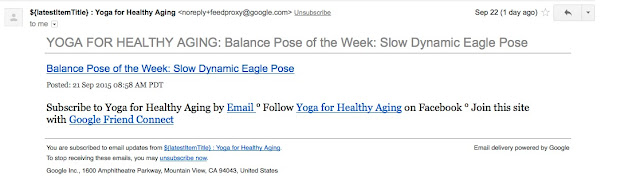
Here’s how the article looks in Google Mail, where I don’t get a black box—I just don’t get anything. The title in blue is the link to the original post.
Why is there an Error?
On our blog, we are able to “embed” videos from YouTube in our posts. So you play them from directly from the post without going to YouTube (which is where the videos actually live). We think this is a great feature!
Unfortunately some (or perhaps all) email systems do not allow videos to be embedded in email. They can have text and photos in them, but not videos. So although the original post has a video in it, the message in your inbox can’t include it.
Why Can’t You Fix This?
Unfortunately some (or perhaps all) email systems do not allow videos to be embedded in email. They can have text and photos in them, but not videos. So although the original post has a video in it, the message in your inbox can’t include it.
Why Can’t You Fix This?
While some people refer to the emails they receive from us as our “newsletter,” that is not technically what they are. Instead, you have signed up for a free Google service called Feedburner that automatically emails you every time we update the blog and sends you a text only version of the blog post. (At least Feedburner documentation says the emails are “text only” but I’ve noticed photographs do come through—who knows…. Still, it is clear that videos don’t come through.)
Now while Feedburner is not without its flaws, it has two qualities that I like: it is automatic and it is free. So until and unless I find an alternative that, likewise, is also free and automatic, I will continue using Feedburner. (Notice I’m saying “I” not “we.” That’s because I’m solely in charge of the technical side of things. All of the other writers just email me articles. I, myself, do all the work of formatting posts and maintaining/troubleshooting the blog.)
If you decide you don’t like getting the emails because there are too many (we have had that complaint), you don’t like the format, or for any other reason, you can always unsubscribe by clicking on the Unsubscribe link in the email. Then you can just read the latest posts on the blog site by going here directly.
We also use a free service from Google called Blogger to create our blog. It also is not without its flaws. I’m not a fan, for example, of how hard it is to find the special pages on the blog or to sign up for email in the first place. But, again, this is a free service and I find it quite easy to use for formatting blog posts. In my dreams, we have a special web site instead that is custom-designed just for us, but that would cost a lot of money, as I’d have to hire someone to design and program it. And as we receive no income from the blog (it’s a non-profit offering), that's not a real possibility.
If anyone out there wants to nerd out by learning even more about how the blog is put together and how the email service works, see my earlier post From the Inside Out: Our Blog and Our Email Service.
And I always welcome technical assistance of any kind, if any of you have some ideas that might help.
—Nina
Now while Feedburner is not without its flaws, it has two qualities that I like: it is automatic and it is free. So until and unless I find an alternative that, likewise, is also free and automatic, I will continue using Feedburner. (Notice I’m saying “I” not “we.” That’s because I’m solely in charge of the technical side of things. All of the other writers just email me articles. I, myself, do all the work of formatting posts and maintaining/troubleshooting the blog.)
If you decide you don’t like getting the emails because there are too many (we have had that complaint), you don’t like the format, or for any other reason, you can always unsubscribe by clicking on the Unsubscribe link in the email. Then you can just read the latest posts on the blog site by going here directly.
We also use a free service from Google called Blogger to create our blog. It also is not without its flaws. I’m not a fan, for example, of how hard it is to find the special pages on the blog or to sign up for email in the first place. But, again, this is a free service and I find it quite easy to use for formatting blog posts. In my dreams, we have a special web site instead that is custom-designed just for us, but that would cost a lot of money, as I’d have to hire someone to design and program it. And as we receive no income from the blog (it’s a non-profit offering), that's not a real possibility.
If anyone out there wants to nerd out by learning even more about how the blog is put together and how the email service works, see my earlier post From the Inside Out: Our Blog and Our Email Service.
And I always welcome technical assistance of any kind, if any of you have some ideas that might help.
—Nina
Subscribe to Yoga for Healthy Aging by Email ° Follow Yoga for Healthy Aging on Facebook ° Join this site with Google Friend Connect


